
Shopify Sidekick, the assistant in your Shopify admin, can look into Convi for you. You can ask what Convi knows, what shoppers asked that it couldn't answer, and how its conversations went, and have Sidekick draft an FAQ. This article is for store owners who already use Sidekick.
Plans: every plan and the free trial · Where: Shopify admin › Sidekick, and Convi admin › Learn › Knowledge · Who: the store owner, and staff who can open Sidekick and Convi in your Shopify admin · Time: about 5 minutes
Before you start: there's nothing to set up in Convi. Shopify says Sidekick isn't available on every store, so check that you can open it in your Shopify admin. Shopify also says Sidekick works with up to 20 apps for each user on a store.
What can Sidekick do with Convi?
Sidekick can read five things from Convi, and it can open an FAQ for you to save. The table below lists each one, with something you can ask. Sidekick chooses how to answer, so its words may differ.
Ask about | Example | What you get |
Convi's knowledge | "What does my assistant know about returns?" | Entries that match, with where each one came from |
Unanswered questions | "What couldn't my Convi assistant answer?" | Questions shoppers asked, most important first, with how often each was asked in the last 30 days |
Conflicting answers | "Does my assistant give contradictory answers?" | Places where two entries disagree, with both claims |
Conversation numbers | "How many Convi conversations were handed over last month?" | One number or a breakdown, for up to 92 days |
Convi's setup | "Is Convi set up correctly?" | Up to 5 things to fix, most urgent first, each with where to fix it |
In unanswered questions, Convi hides emails, phone numbers, order numbers and links.
Add an FAQ with Sidekick
Sidekick can draft an FAQ and open it in Convi. Nothing is saved until you save it. To add one:
Open Sidekick in your Shopify admin.
Ask for the FAQ, for example "Add a Convi FAQ saying shipping to Germany takes 3 to 5 business days." Convi's Learn › Knowledge opens, with the Add FAQ window filled in.
Read the question and the answer. Edit them yourself, or ask Sidekick for a change, such as "Make the answer shorter."
Select Add FAQ.
You'll see "FAQ added successfully." If you close the window instead, nothing is saved.
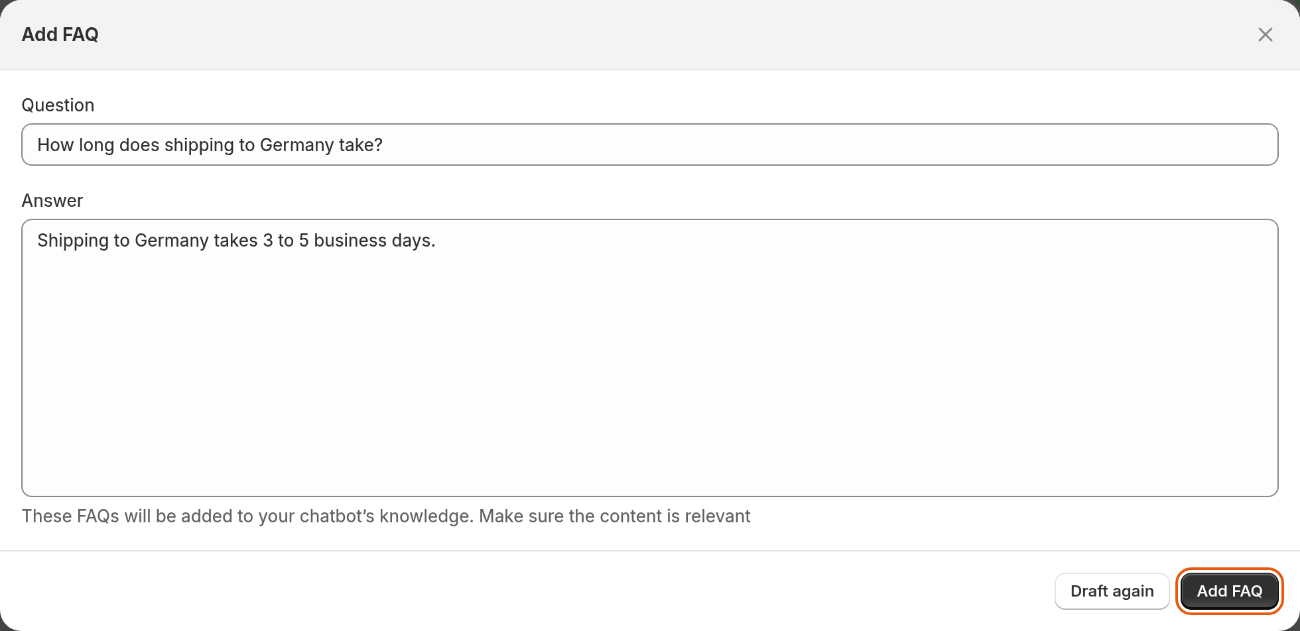
Sidekick fills in the window. Only your Add FAQ saves it.
To answer an unanswered question, ask Sidekick to add an FAQ for it. Keep the question exactly as listed: when you save, the question leaves the list. If the wording differs, the FAQ is saved, and the question stays listed.
Edit an FAQ with Sidekick
Sidekick can find an entry and open it for you. To change one:
Ask Sidekick to change the entry, for example "Change my Convi FAQ on returns to say 30 days." The Edit FAQ window opens, with the new text filled in.
Read it, and select Save.
For an entry that isn't an FAQ, such as an imported page, the window shows Title and Content, and you select Edit knowledge.
Sidekick can't change entries that come from Shopify, such as your policies. Edit those in Shopify, and Convi picks up the change automatically.
What does the setup check look at?
The setup check is read-only: it tells you what to fix, and it changes nothing. It looks at these points:
whether the Convi widget is on in your theme;
whether shoppers have questions Convi can't answer;
whether your knowledge contradicts itself;
whether you've added any FAQs or active rules;
whether you've written Advanced instructions;
whether the chat still opens with the default welcome line, and the widget still uses Convi's default colour.
What Sidekick doesn't do with Convi
Sidekick works with Convi in a few ways only:
It can't save anything in Convi. You save each FAQ yourself.
It can't change skills, rules, persona or widgets. Change those in the Convi admin.
It can't reply to shoppers or open conversations.
It only sees the store you're in.
If you want an assistant that works on Convi from outside Shopify, see Use Convi from Claude or ChatGPT.
Related
Answer the questions Convi couldn't answer — the same questions, in Learn › Improve.
Fix conflicting answers in Convi's knowledge — resolve what Sidekick finds.
Set up Convi by chatting with Convi Coach — Convi's own assistant, inside the Convi admin.