
Convi is an AI shopping assistant and support agent for Shopify stores. It helps shoppers find the right products and answers their questions from your store's content. It also handles tasks such as order tracking, and hands a conversation to your team when it needs a person. This article gives store owners the full picture before they set Convi up.
Plans: every plan and the free trial; some features need a higher plan · Where: your online store, the messaging channels you connect, and the Convi admin inside Shopify · Who: store owners new to Convi
How does Convi work?
Convi works in five stages, from your store's content to your shoppers' answers:
Convi reads your store. When you install it, Convi reads your products, collections, pages, policies, blogs and shop info.
You choose where shoppers see Convi. The chat bubble, the Bubble widget chatbot, is on from the start: you turn on other widgets and switch on Convi's app embed in your theme.
Shoppers ask, and Convi answers. Convi answers from your store's content and uses the skills you turn on, such as order tracking.
Convi hands over when it should. When a shopper needs a person, Convi passes the conversation to your team.
You see the results. Every conversation is in Conversations, and Analyze shows what Convi did for your store.
When you first open Convi, a short guided setup reads your store, lets you try Convi, helps you switch it on in your theme and lets you choose a plan. The rest of the Convi admin opens when you finish it. Home then shows any steps left to go live: Go live with the setup steps on Home.
Where do shoppers meet Convi?
Shoppers meet Convi in the widgets on your online store. The table below lists the widgets on the Widgets page and where each one appears.
Widget | What shoppers see | Where |
Bubble widget chatbot | The chat, opened from a floating button or, in AI Mode, a bar at the bottom of the page | Every page |
Inline chat | The chat inside a section of your theme | Where you place its block |
AI FAQ Widget | Questions about the product; a click opens the chat with that question | Product pages |
Ask AI Button | A button that opens the chat about the product | Product pages |
AI Search Bar | A search bar that understands plain language | Where you place its block |
Find similars | A button that shows similar products | Product pages |
AI Review Summary | A short summary of the product's reviews | Product pages |
WhatsApp Widget | A button that opens a chat with your store on WhatsApp | Every page |
Convi can also answer in the apps shoppers already message you from: by email on Starter and higher plans, and on WhatsApp, Instagram and Messenger on Pro and higher. The free trial includes them all. Channels lists them and shows which ones your plan includes.
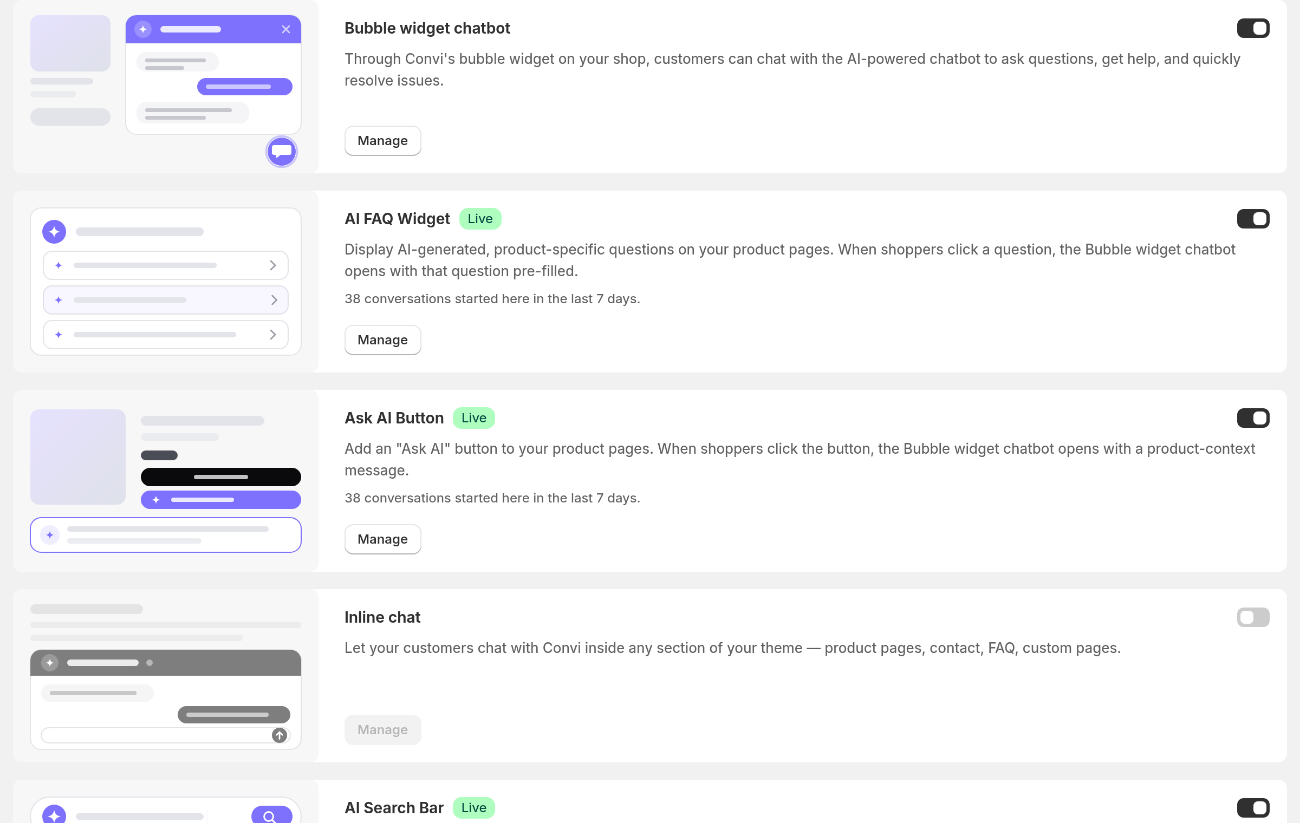
The Widgets page: each card turns a widget on and opens its settings.
What can Convi do for shoppers?
Convi's tasks are called skills, and you choose them in Learn › Skills. With the skills on, Convi can:
find products and compare them, and build the cart in the chat;
answer questions from your pages, policies and FAQs, and from the web if you allow it;
track orders;
on Starter and higher plans, change an order's shipping address, and cancel and refund an order if you allow it. The shopper first enters a code sent to the order's email;
share your discount codes, and, on Starter and higher plans, sign shoppers up for your email list;
on Starter and higher plans, sign shoppers up for restock alerts, with the Notify Me! app;
on Starter and higher plans, let signed-in shoppers skip, pause or cancel their Subi subscriptions;
follow up with a shopper who stops writing, and hand a conversation to your team.
The free trial includes every skill.
See Choose what Convi can do with skills for every skill and how to set it up.
What does Convi learn from?
Convi answers from your store's own content. It reads your products, collections, pages, policies, blogs and shop info from Shopify, and picks up changes you make there automatically. You can add more in Learn › Knowledge: FAQs you write, and pages, PDFs, websites and helpdesk replies you import. See How does Convi learn about my store?.
What's in the Convi admin?
The Convi admin opens inside your Shopify admin. The table below lists its areas, in the order of the menu.
Area | What you do there |
Home | Follow the setup steps, then see how Convi is doing |
Conversations | Read every conversation, take one over and give it back to Convi |
Learn | Teach Convi in Improve, Knowledge, Persona, Skills and Rules, and test it in the live preview |
Widgets | Choose where Convi appears on your storefront, and how it looks |
Channels | Let Convi answer by email and in messaging apps |
Integrations | Connect your helpdesk, your email marketing app and other apps |
Analyze | See conversations, quality and the sales Convi helped make |
Settings | Your plan and billing, notifications, team members and the public API (on Premium and higher plans), languages, what's new and feature requests |
What does Convi cost?
Convi has a free trial of 7 days or 100 conversations, then paid plans billed every 30 days through Shopify. Each plan includes a number of conversations, and each extra one costs the plan's rate. A conversation counts only when it ends with Convi answering the shopper, not your team. There is no free plan: the Free plan limit badge you may see on Home means that Convi reads only about 1,000 of your products until you pick a plan. See Convi's plans and prices.
What doesn't Convi do?
Convi has limits, and it's clear about them with shoppers:
Convi answers only from your store's content, from the web if you turn on Web search, and with its skills. When nothing matches, it says so and offers to pass the shopper to your team, or takes their email for your team, depending on Where handoffs go.
Convi doesn't cancel an order or change an address until the shopper enters the code sent to the order's email.
After the free trial, Convi stops answering until you pick a plan.
Related
Go live with the setup steps on Home — the four steps that put Convi on your store.
Choose what Convi can do with skills — every task Convi can do, and how to turn it on.
Convi's widgets don't appear on my store — what to check when shoppers can't see Convi.