
This article is for store owners and the team members who keep Convi's answers up to date. Convi answers shoppers from what it reads in your Shopify store and from the knowledge you add. Here is where that knowledge comes from, and how to keep it complete and current.
Plans: every plan, and the free trial · Where it appears: Convi admin › Learn
How does Convi learn about my store?
Convi learns about your store in five stages:
It reads your store. When you install Convi, it reads your products, collections, pages, policies, blogs and shop info. You don't need to do anything.
It stays in sync. When you change a page or a policy in Shopify, Convi picks up the change automatically.
You add what your store content doesn't cover. In Learn › Knowledge, you write FAQs or import pages, PDFs, a website or your helpdesk's content.
Shoppers show what is missing. When Convi can't answer a question, it lists it in Learn › Improve, so you can add the answer.
You test the answer. The live preview on every Learn tab shows what shoppers see. Test chats don't count toward your usage.
Note: During the free trial, Convi reads up to 1,000 products. Every paid plan reads your whole catalog.
What does each tab in Learn teach Convi?
Learn in the Convi admin has five tabs. Each one teaches Convi something different, as the table below shows.
Tab | What it teaches Convi |
Improve | Which questions your content doesn't cover yet, and which answers disagree |
Knowledge | The facts Convi answers from: your store content and the knowledge you add |
Persona | The assistant's name, tone of voice, answer length and advanced instructions |
Skills | The tasks Convi can do for shoppers, such as order tracking or handover to your team |
Rules | Plain-English instructions Convi follows in every conversation |
Use Knowledge for facts, such as "We ship to Norway in 5–8 business days". Use Rules for behaviour, such as "If a customer asks for a refund over $200, hand over to a human".
Where does Convi's knowledge come from?
Every entry in Learn › Knowledge has a Source that says where it came from. You can filter the list by most sources. The table below explains each one.
Source | Where it comes from | Where you edit it |
Policies, Pages, Blogs, Shop Info, Metaobjects | Your Shopify store | In Shopify: select Update in Shopify on the entry |
FAQ | Questions and answers you wrote, and PDFs you imported | In Convi |
URL | Pages and websites you imported | In Convi |
Helpdesk | Content imported from Gorgias or Freshdesk | In Convi |
Content gap | Answers you added to questions Convi couldn't answer | In Convi |
Enhanced chat, Handed over | Written by Convi from shopper conversations | In Convi |
Entries from Shopify are read-only in Convi. Change them in Shopify, and Convi picks up the change automatically.
Add knowledge to Convi
You add knowledge in Learn › Knowledge when your store content doesn't cover a question. To add it:
Go to Learn › Knowledge.
Select Add knowledge.
Choose one of these:
Write an FAQ: one question and its answer, in your words.
Import a page: one link, such as a care guide or a size chart.
Import a PDF: one PDF file, up to 10 MB.
Import a website: Convi finds the pages on a site, and you pick which ones to add.
Import from a helpdesk: saved replies from Gorgias, or articles and saved replies from Freshdesk.
Check the text Convi shows, and edit it if you need to.
Save it.
You'll see a confirmation, such as "FAQ added successfully." or "Knowledge imported successfully.", and the entry appears in the list.
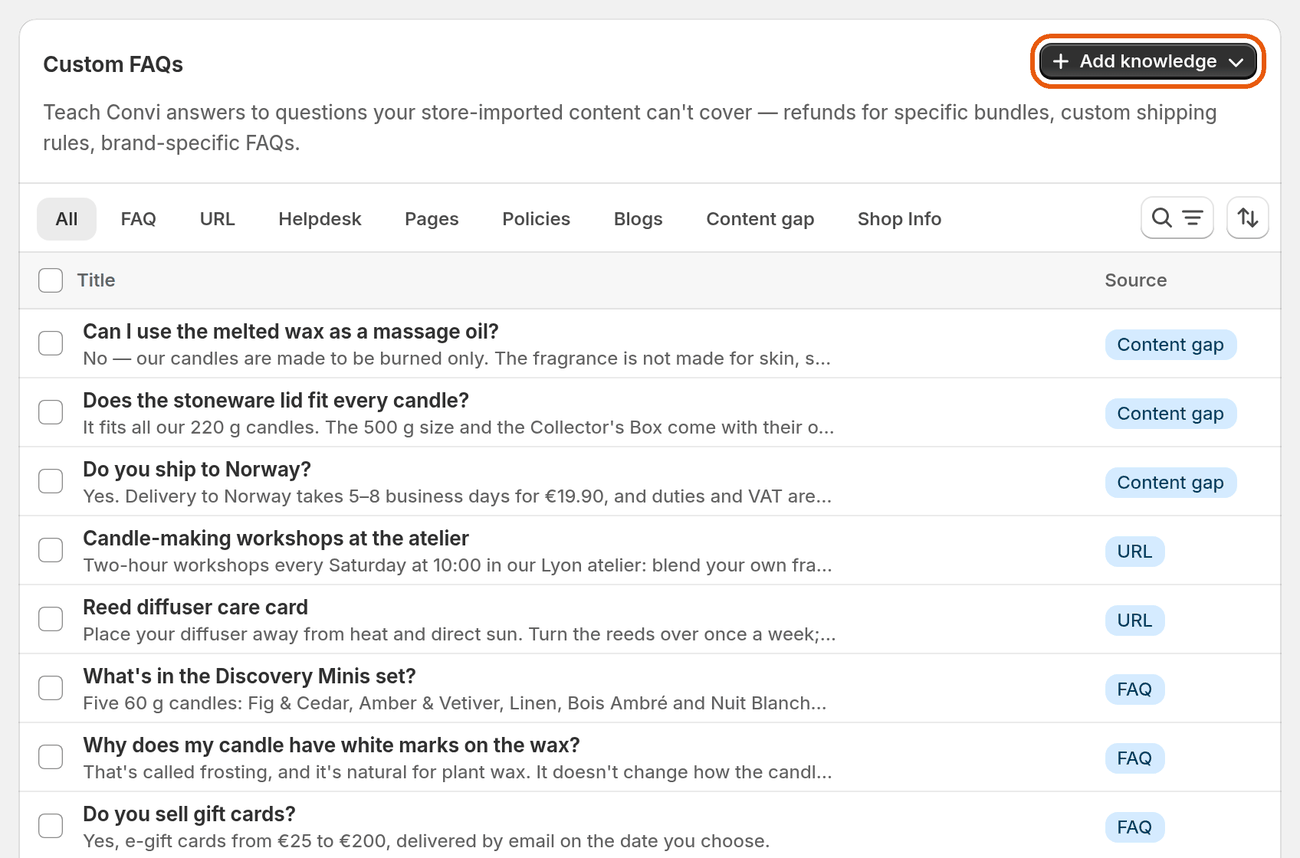
Learn › Knowledge lists the entries Convi answers from, with the source of each.
Tip: Write the question the way a shopper asks it, for example "How long does shipping take to Germany?". Convi finds answers by meaning.
See what to teach Convi next
Learn › Improve shows how well your content covers what shoppers ask Convi. Its score is the share of Convi's lookups in the last 30 days that found something in your content.
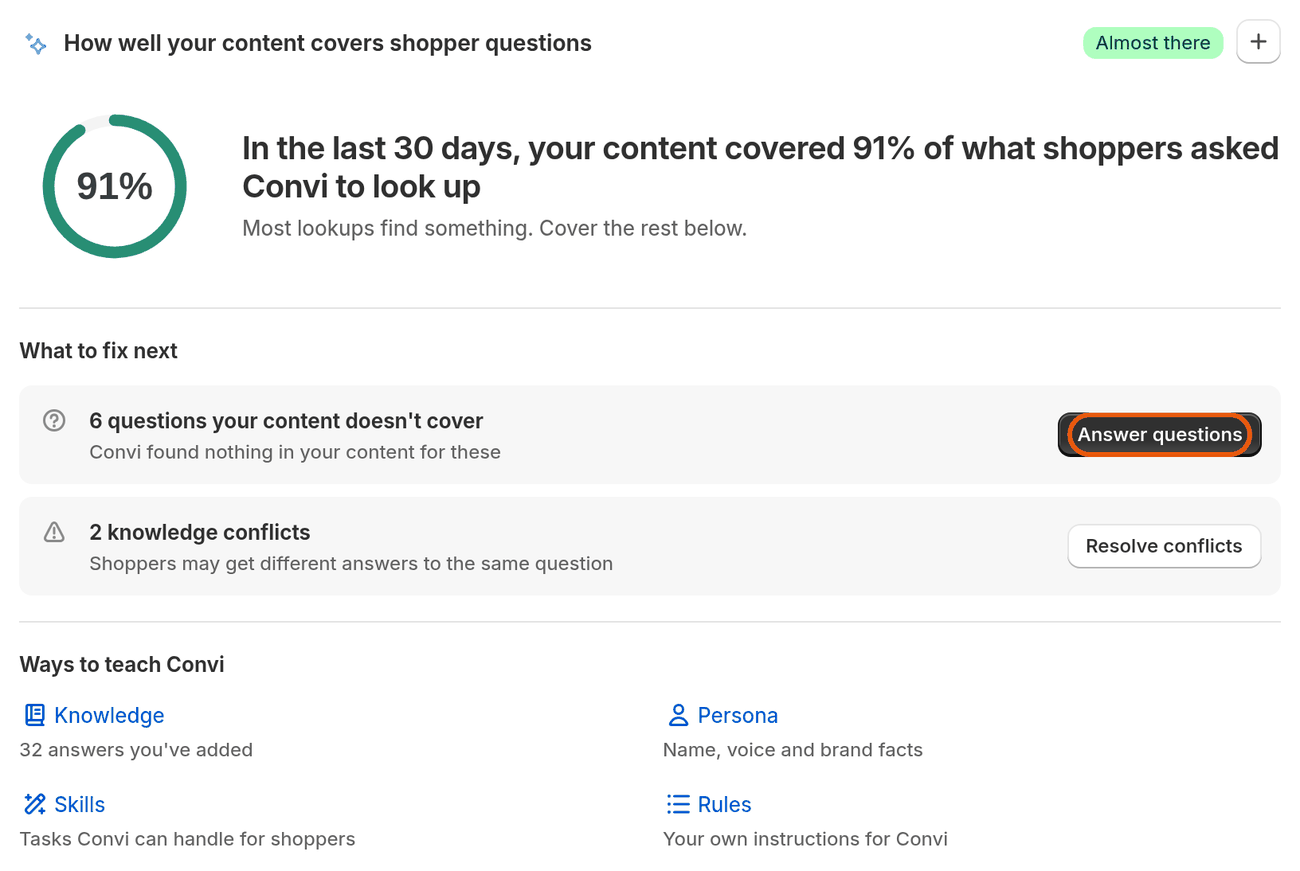
Learn › Improve: the coverage score and the questions to answer next.
Under What to fix next you'll find two kinds of work:
Knowledge gaps: questions shoppers asked that Convi couldn't confidently answer. Select Add an answer to write the answer, and Test to ask the question in the live preview. Gaps appear once real shoppers start chatting.
Knowledge conflicts: two entries that give different answers to the same question. Select Resolve, then choose which answer is correct, or write the correct one.
What Convi's learning doesn't do
Convi's learning has these limits:
It doesn't change your Shopify content. Entries from Shopify are read-only in Convi.
When nothing in your content matches a question, Convi says so and offers to pass the shopper to your team, if handover is on.
It can't import a page that needs a sign-in. Write that content as an FAQ instead.
Related
Why isn't Convi answering shoppers? — what to check when answers are missing or weak.
Hand over a conversation and take it back — what happens when Convi can't answer.
Go live with the setup steps on Home — the first steps after you install Convi.