
Convi Coach answers questions about your store in plain words. You can ask what shoppers want, how Convi is doing, or why shoppers ask for a person, and get counts, charts and real quotes back. This article shows you how to ask and what to do with the answer. It is for store owners and team members who want answers without reading every report.
Plans: every plan and the free trial. A store with no active plan or trial doesn't get charts of orders from chat · Where: Convi admin › Analyze, or Ask Convi Coach on any page · Who: the store owner, and team members whose role allows it · Time: about 2 minutes
Ask a question in Analyze
The Ask about your conversations box is at the top of every Analyze tab. To ask a question:
Go to Analyze.
If the tab has a date range button, pick your dates.
Type your question in the box.
Select Ask. The Convi Coach panel opens beside the page and answers.
You can also select a suggestion under the box. It sends at once. For example: What did shoppers ask about most?
On Overview, Activity, Quality and Revenue, Convi Coach uses the tab and the dates on your screen. On Live, or on My dashboard without a range picked for all cards, include the dates you mean in your question.

The box is at the top of every tab. The suggestions are a quick way to start.
You can also select Ask Convi Coach at the bottom right of any page. Then say which dates you mean, for example "this week".
What can I ask?
Convi Coach can count, draw and read. The table below shows what it does for each kind of question.
Kind of question | For example | What you get |
A number | "How many conversations did we hand over this week?" | The count or the rate |
A chart | "Chart AI resolution by week this month" | A chart you can keep |
What shoppers said | "What are unhappy shoppers saying?" | Themes with real quotes from conversations |
Orders from chat | "How much revenue did Convi drive?" | The figure or a chart. A chart needs an active plan or the free trial |
For a "what shoppers said" question, Convi Coach reads what shoppers wrote in up to 100 matching conversations, then groups what it finds into themes with quotes. If more conversations match, it reads 100 spread across the period. It tells you how many matched, how many it read and how many spoke to your question. Its counts describe the conversations it read. If fewer than five spoke to your question, it says the evidence is thin.
Use a chart in the answer
A chart in an answer comes with a title, its dates and a line saying what it counts. You can work with it in three ways:
Change the chart type: select Bar, Line, Donut, Number or Table at the top of the chart. Only the types that fit the chart appear.
Open the conversations: when the chart says you can, select a bar or a slice, or a row in Table.
Keep the chart: select Add to My dashboard. You'll see On My dashboard. The card counts again each time you open it.
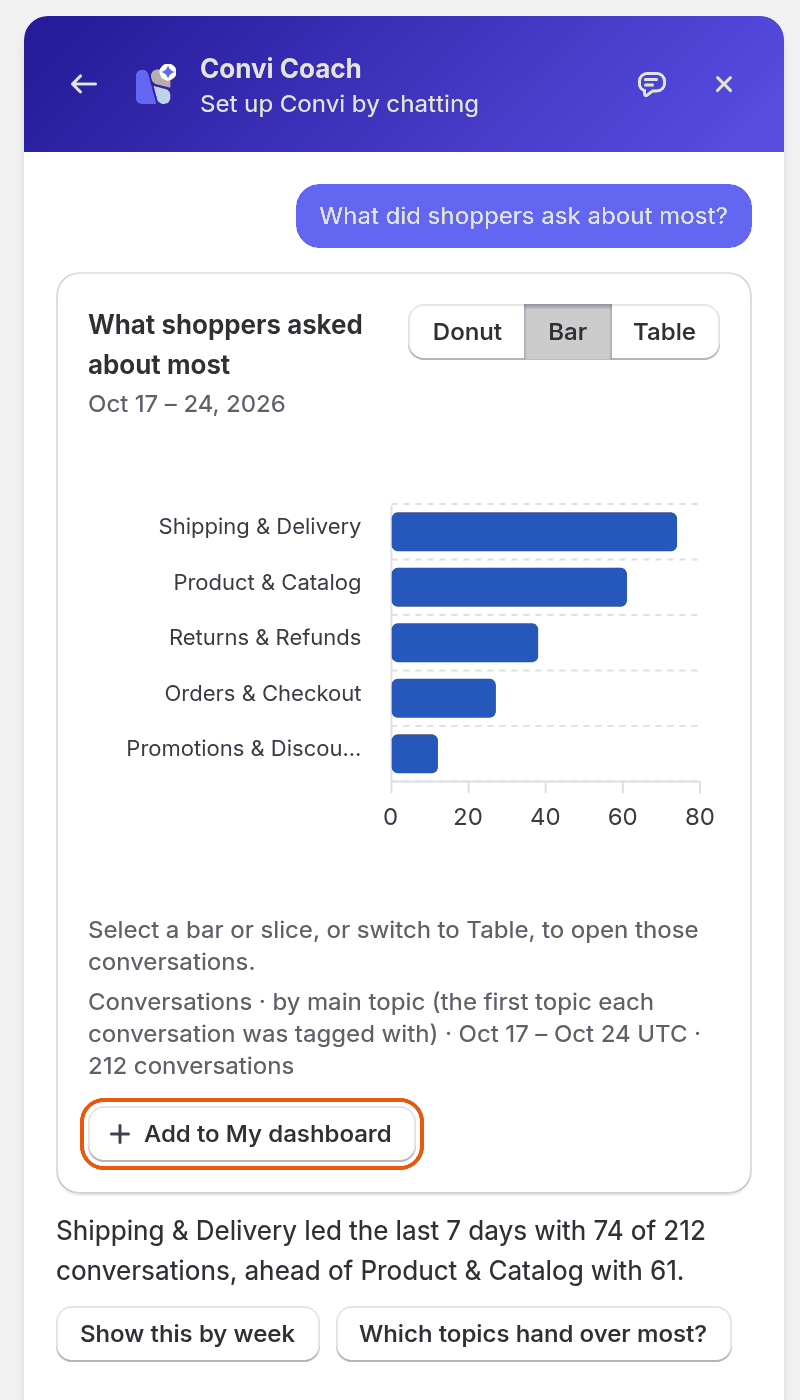
A chart in Convi Coach. Add to My dashboard keeps it as a card.
After the answer, Convi Coach suggests follow-up questions. Select one to ask it.
What doesn't Convi Coach answer?
Convi Coach has a few limits on questions about your numbers:
It measures at most 365 days at a time, so ask about 365 days or fewer.
Some charts can't be drawn from the data Convi keeps. It tells you and suggests charts it can draw.
A question over a very long period can take too long to count. It says so and offers a shorter period.
If your plan doesn't include the data, it tells you and draws nothing.
Related
Set up Convi by chatting with Convi Coach — change your settings by chatting, and audit your setup.
What does each Analyze tab show? — the reports beside the box.
Answer the questions Convi couldn't answer — turn what you learn into answers.
Build your own dashboard in Analyze — templates, charts and layout.
Find what shoppers ask and where Convi struggles — the Activity and Quality tabs.