
The Live tab shows what is happening on your store at this moment: who is visiting, who is chatting, and who is waiting for your team. Use it to catch a shopper who needs a person, or to watch a sale or a launch. This article is for store owners and team members.
Plans: every plan and the free trial. Two columns need a higher plan, marked below · Where: Convi admin › Analyze › Live, or Open Live on Home · Who: the store owner, and team members whose role allows it
How do I open Live?
Open Analyze › Live. Home also shows a line such as "7 shoppers in a chat now", or "No active shoppers right now". Select Open Live on that line.
Live updates itself: the numbers change as messages come in, and they also refresh every 30 seconds. If the connection drops, a banner says so, and the numbers keep refreshing. If your store isn't live yet, the tab says "Convi isn't live on your storefront yet" and links to Home.
What does Right now show?
Right now shows your visitors and your open chats at this moment. The table below explains each figure.
Figure | What it counts |
Visitors right now | Everyone with your store open now, on any page. One person counts once, however many tabs they have open. The line below adds how many came in the last 30 minutes |
Shoppers in a chat | Open conversations active in the last 30 minutes, and every shopper still waiting for your team. The line below shows how many are with Convi, with your team, and waiting |
Waiting for a person | Chats handed to your team that nobody has answered yet, with the longest wait |
AI reply time | How long Convi took to send each reply today, on average |
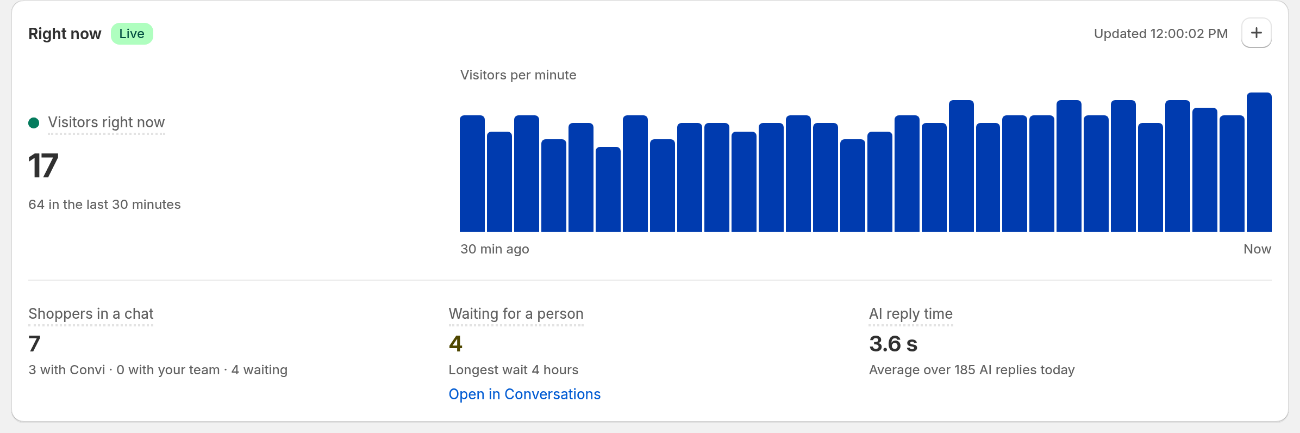
The chart beside the number shows visitors per minute over the last 30 minutes.
When shoppers are waiting, select Open in Conversations on Waiting for a person to open those chats. When nobody is on your store, the chart shows the hours that are usually busiest, once your store has a week of visitor data.
While someone is on your store, Devices splits the visitors into desktop, mobile and tablet. Top pages right now lists up to five of the pages they have open. It leaves out pages Convi doesn't see, like checkout.
What does Live conversations show?
Live conversations lists your open conversations, those waiting for a person first, then the longest running. To open one, select Open on its row. The table below lists the columns.
Column | What it shows |
Conversation | The conversation's title and topic |
Answering | Convi, Your team, or Waiting with the time |
Channel | Where the shopper is writing from, and their device |
Current page | The type of page the shopper is on. Pro and higher, not in the free trial |
Cart | The value of the shopper's cart. Pro and higher, not in the free trial |
Order | Ordered if the chat already led to an order, or No order |
Duration | How long the conversation has been open |
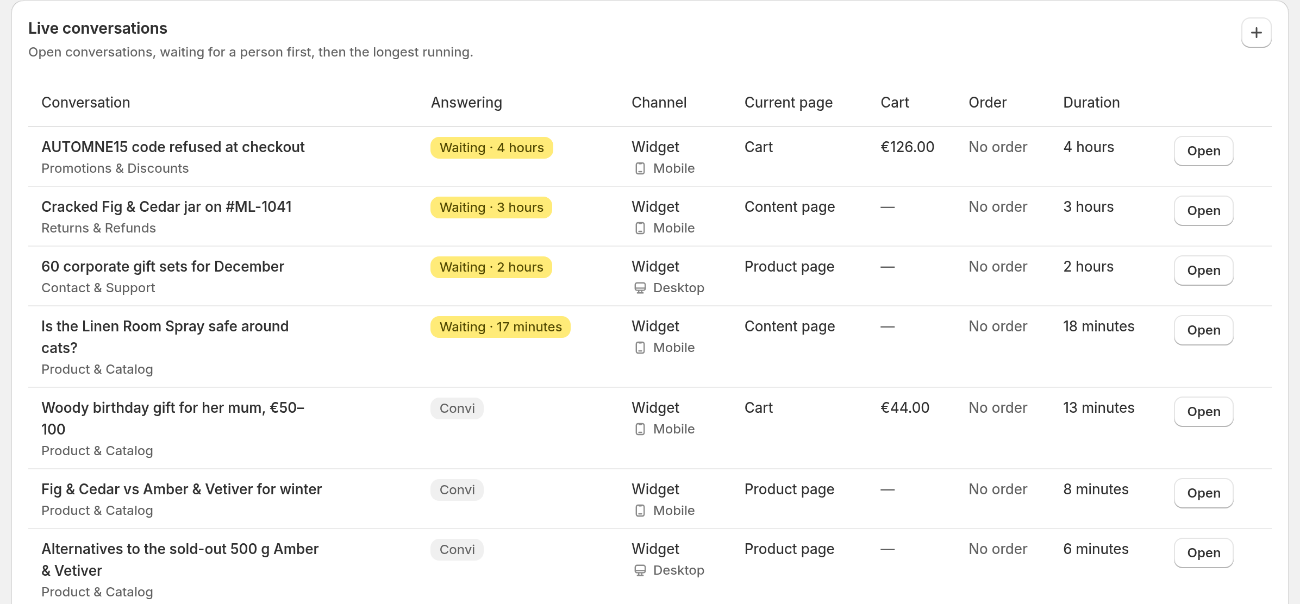
A shopper who is waiting for a person comes first.
A dash (—) means Convi doesn't know the value yet. The current page shows once the shopper has sent a message from your store. It is the page they last wrote from, or the page they're on now if they agreed to tracking. The cart value shows once their cart has changed in the last hour.
How is today going?
Today so far counts today's activity and shows the same time last week beside most figures. Closed by Convi and Handed over show today only. "Today" starts at midnight UTC, not at midnight in your store's time zone. The table below explains each figure.
Figure | What it counts |
Visitors | Different people who opened your store today. Someone who comes back later counts once |
Conversations | Chats started today on any channel. The "still open" count leaves out chats handed to your team |
Closed by Convi | Chats started today that Convi closed without a handover after 10 quiet minutes, answered or not |
Handed over | Chats started today that went to your team, answered or not |
Assisted orders | Orders placed today that Convi assisted, as on the Revenue tab |
Assisted revenue | The value of those orders |
Closed by Convi isn't the same as AI resolution on the Overview tab. Whether Convi really answered is checked about an hour later, so AI resolution can be lower.
What doesn't Live do?
Live is for watching, so it has limits:
You can't reply here. Select Open to go to the conversation.
It has no date range and no Export CSV. For other days, use the other Analyze tabs.
It lists at most 100 open conversations.
Staff questions on Shopify POS aren't shown.
Related
What does Convi's Home page show? — the Live line and the conversations that need you.
Hand over a conversation and take it back — what to do with a shopper who is waiting.
What does each Analyze tab show? — the reports for other days.
How does Convi count sales from chat? — the 14-day rule and each Revenue figure.
Ask Convi Coach about your conversations and numbers — what Coach can count, draw and read.