
With Offer discounts on, Convi can share a discount when a shopper asks for a deal or hesitates over the price. This article shows how to choose what Convi may offer and how to limit it. It is for store owners who set discounts.
Plans: every plan and the free trial · Where: Convi admin › Learn › Skills · Who: the store owner, and team members whose role allows it · Time: about 5 minutes
Before you start: create in Shopify the discount codes you want Convi to share. They show in Convi's list without any import.
Warning: This skill affects your revenue, and its card carries the badge Higher risk. Create one-time codes when no code applies makes real discount codes in your Shopify store. Check the limits below before you turn it on.
How does Convi decide what to offer?
Convi offers a discount in the storefront chat, in this order:
A shopper asks about deals, or says the price is too high. A suggested question such as "What's on sale?" in a nudge counts as asking. Convi is told not to bring up discounts on its own.
Convi looks for the codes you picked, and for active automatic discounts if you allow them. It keeps those that are live and apply to the product the shopper is asking about, and shares up to 3 with their terms. If the shopper isn't asking about one product, it can share any live discount you allow, even one limited to a collection.
If nothing applies and you allow one-time codes, Convi creates one for that shopper.
If there's still nothing, Convi says no discount is available right now.
Turn on Offer discounts
Offer discounts is off until you turn it on. To set it up:
Go to Learn › Skills.
On the Offer discounts card, select Configure.
Under Codes Convi can share, tick the codes Convi may offer.
Under More ways to offer a deal, choose whether to use Mention Shopify automatic discounts and Create one-time codes when no code applies.
Turn on the switch beside This skill is off.
Select Save. You'll see "Skill updated successfully".
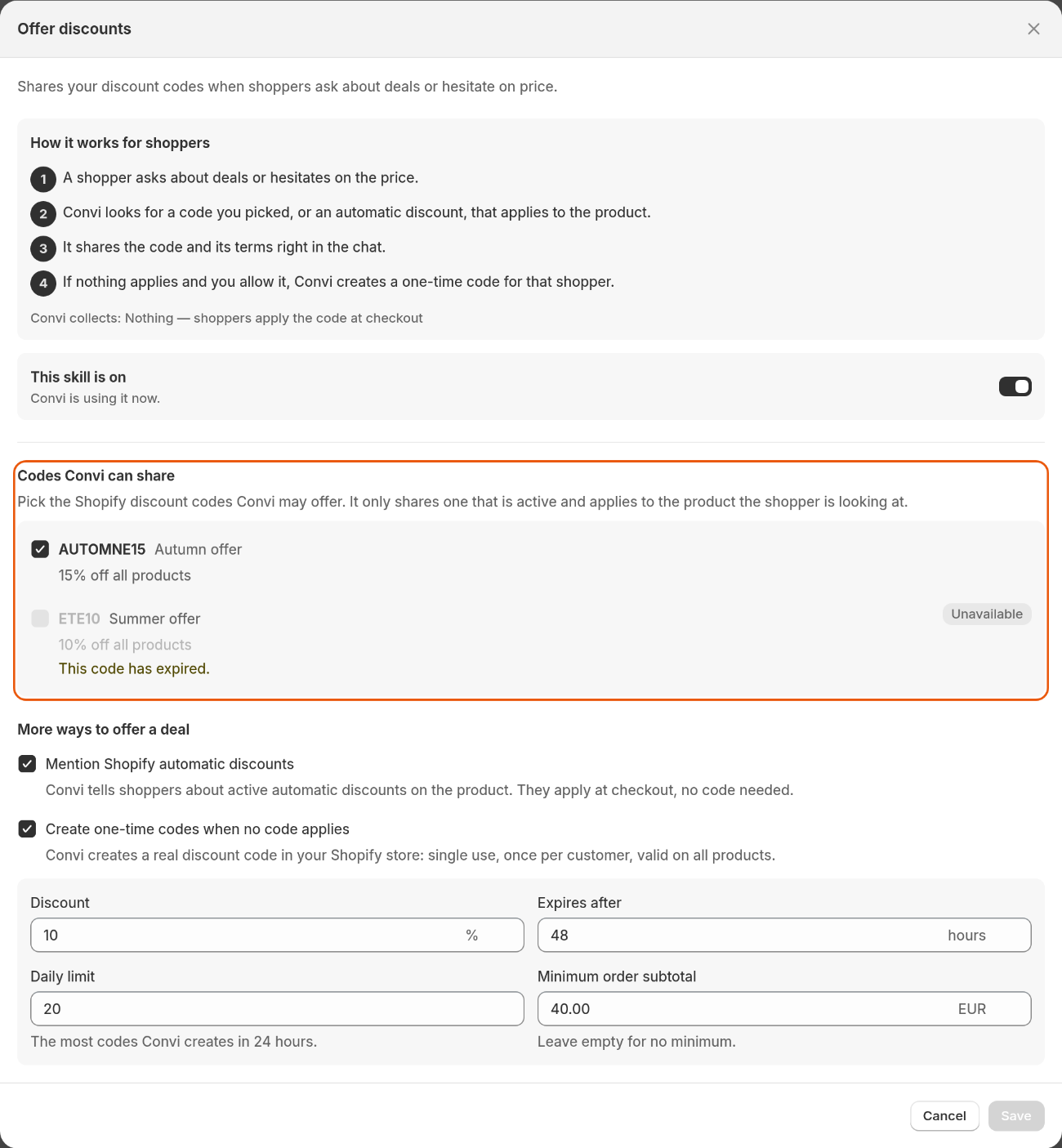
Codes Convi can share lists your Shopify codes. Here one code has expired, so it's marked Unavailable.
Mention Shopify automatic discounts starts ticked. These discounts apply at checkout, so Convi tells the shopper that no code is needed.
Why is a code marked Unavailable?
A code marked Unavailable can't be ticked, and Convi doesn't share it, even if you ticked it before it became unavailable. The table below lists each reason the panel shows.
Reason | What to do |
This code has expired. | Pick another code, or extend it in Shopify |
This code hasn't started yet. | Wait for its start date in Shopify |
This code is limited to specific customers. | Open it to all customers in Shopify, or pick another |
Discounts created by other apps can't be shared. | Pick a code made in Shopify |
This code has no characters a shopper can type. | Give it a new code in Shopify |
This discount takes nothing off. | Give it a value in Shopify |
How do one-time codes work?
A one-time code is a code Convi creates in your store when nothing else applies. The table below lists its settings, which show when you tick Create one-time codes when no code applies.
Setting | What it does | Allowed | Default |
Discount | The percentage off | 1–50, whole numbers | 10% |
Expires after | How long the code works | 1–720 hours, whole numbers | 48 hours |
Daily limit | The most codes Convi creates in 24 hours | 1–1000, whole numbers | 20 |
Minimum order subtotal | The smallest order the code works on, in your store's currency | 0.01 or more, or empty for no minimum | Empty |
Every one-time code works the same way:
It starts with
CONVI-and shows in Shopify's discounts as "Convi chat offer", followed by the code.It works once in total, for whoever uses it first, on one-time purchases of any product.
It can't be combined with other discounts.
Convi creates at most one code per conversation, so a shopper who starts a new conversation can get another. A code counts toward Daily limit when it's created, whether or not anyone uses it. Once the limit is reached, Convi creates no new codes, and says no discount is available if nothing else applies. One-time codes don't show under Codes Convi can share.
Check that Offer discounts works
To test it:
Save your settings, and go to the live preview in Learn.
Ask "Do you have a discount on" and the name of a product. Convi answers with a code and its terms, tells the shopper about an automatic discount, or says no discount is available.
Warning: The live preview uses your real settings. If Create one-time codes when no code applies is on and no other code applies, the test creates a real code in your Shopify store, and it counts toward Daily limit.
What Offer discounts doesn't do
It doesn't add a code to the cart. The shopper enters the code at checkout.
It runs only in the storefront chat, not in email or other channels.
It can't offer discounts made by other apps.
It can't give a different discount to different shoppers. A one-time code always uses the settings above.
Related
Choose what Convi can do with skills — the skills Convi has, and the Higher risk badge.
Collect shoppers' emails with Lead capture — give a discount code in exchange for an email.
Write rules Convi always follows — tell Convi how to talk about deals.