
Skills are the tasks Convi can do for shoppers in a chat, such as tracking an order or adding products to the cart. This article is for store owners who want to choose which tasks Convi handles, and how.
Plans: every plan and the free trial; some skills need a higher plan · Where: Convi admin › Learn › Skills · Who: the store owner, and team members whose role allows it · Time: about 5 minutes
What is a skill?
A skill is a task Convi can do in a conversation. For example, with Order tracking on, Convi looks up a shopper's order in Shopify and shows its status. With Knowledge search on, Convi answers from your pages, policies and FAQs. You choose which skills are on in Learn › Skills.
Which skills does Convi have?
Convi has 14 skills. The table below lists them in the order Learn › Skills shows them, with what each one does.
Skill | What it does |
Products search | Recommends the right products in chat and in the AI search bar. |
Knowledge search | Answers from your pages, policies and FAQs. |
Handover to human | Routes hard cases to your team with full context. |
Order tracking | Lets shoppers self-serve "where's my order?" |
Cart management | Builds the cart mid-chat, so checkout is one tap away. |
Proactive engagement | Sends one short follow-up when a shopper stops writing in an open chat, about what they were discussing. |
Edit shipping address | Fixes wrong addresses before fulfilment, so parcels don't come back. |
Order cancellation | Cancels eligible orders within your rules. |
Web search | Answers from the web when your own docs can't. |
Lead capture | Asks shoppers for their email, right after Convi first shows them products in the chat. |
Offer discounts | Shares your discount codes when shoppers ask about deals or hesitate on price. |
Manage subscriptions | Lets signed-in shoppers skip, pause, resume, reschedule or cancel their Subi subscriptions from chat. |
Subscribe for restock alert | Signs shoppers up for back-in-stock alerts through your Notify Me! app. |
The Startup plan doesn't include Order cancellation, Edit shipping address, Lead capture, Manage subscriptions or Subscribe for restock alert. The free trial includes every skill. See conviapp.com/pricing for each plan, and "What if my plan doesn't include a skill?" below.
Turn a skill on or off
Each skill has a card on Learn › Skills with a switch. To turn a skill on or off:
In the Convi admin, go to Learn › Skills.
Find the skill's card. Its badge shows On or Off.
Select the switch on the card.
The change is saved at once, and the badge changes. The summary card at the top shows how many skills are on.
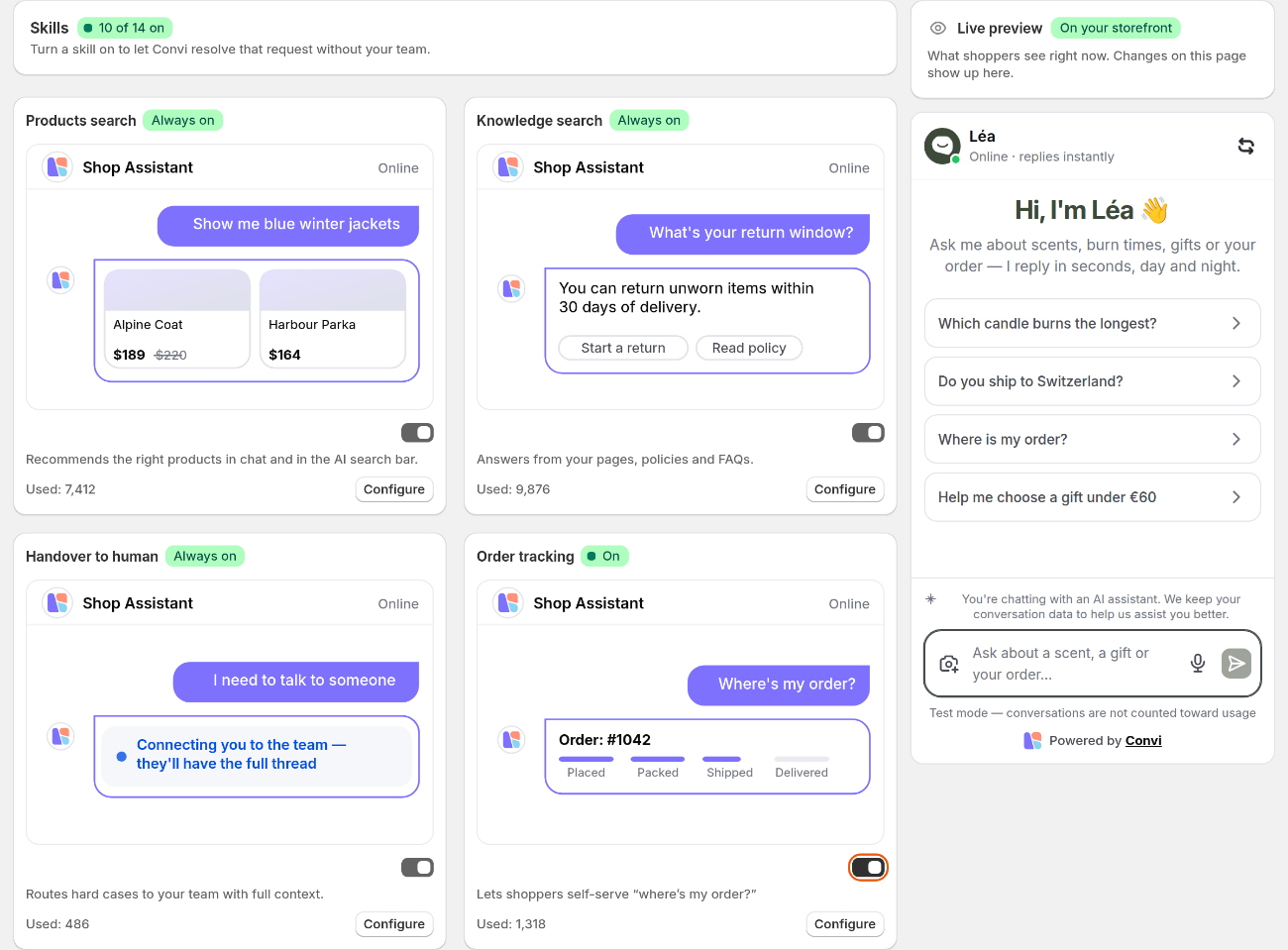
Learn › Skills shows each skill as a card, with its status, its switch and Configure.
A skill with the badge Always on can't be turned off: its switch stays on. These are Products search, Knowledge search and Handover to human. You can still change their settings with Configure. Products search runs in every conversation, so Convi always recommends products.
Set up a skill
Every skill has a panel with its settings. To set up a skill:
Go to Learn › Skills.
On the skill's card, select Configure.
Change the settings. For every skill except Handover to human, the panel also shows How it works for shoppers, step by step.
Select Save.
You'll see "Skill updated successfully", and the panel closes. In the panel, This skill is on or This skill is off shows the skill's status, with a switch to change it. It comes after How it works for shoppers, and the skill's own settings, if it has any, come after it. A skill with the badge Always on shows that badge instead of the switch.
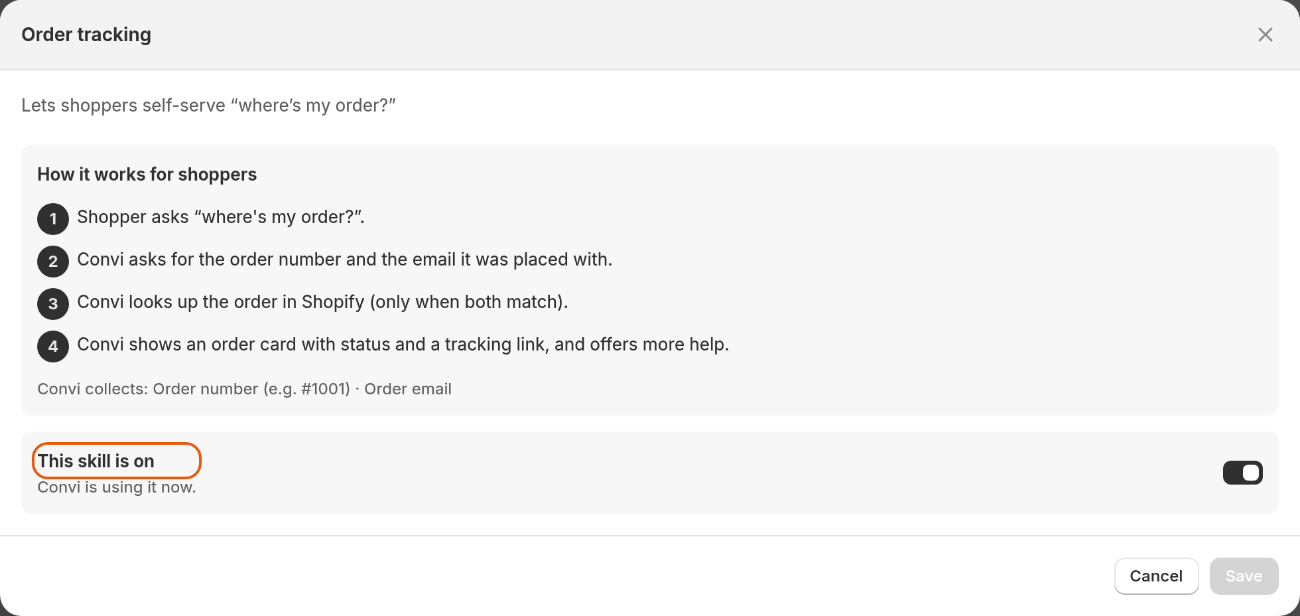
The Order tracking panel: how the skill works for shoppers, then its status and switch.
The table below lists the skills that have settings of their own.
Skill | What you can set |
Products search | Rules that Boost products higher, Bury products lower or Hide from search results, by tag, title, product type, vendor or inventory. Every store starts with a rule that buries out-of-stock products. Save a new rule with its own Add button, and a changed rule with Update. |
Handover to human | Where handoffs go and when to hand over. See Hand over a conversation and take it back. |
Order cancellation | Cancel order rules: The admin decides or AI agent decides. AI agent decides cancels and refunds the order in Shopify on its own. |
Edit shipping address | Edit address rules: the same two choices. |
Web search | Domain filtering: Blocked domains (Recommended) or Allowed domains only, with up to 100 domains. |
Lead capture | An optional Discount code for new subscribers. It must be an existing Shopify percentage code, open to all customers and limited to one use per customer. |
Offer discounts | Codes Convi can share, Mention Shopify automatic discounts and Create one-time codes when no code applies. |
How do order cancellations and address changes work?
Order cancellation and Edit shipping address aren't on the Startup plan. Convi changes an order only after the shopper proves the order is theirs. Convi emails a 6-digit code to the order's email address, and the shopper types the code in the chat. Then:
Order cancellation with AI agent decides: Convi cancels the order in Shopify, refunds the full payment to the shopper's original payment method, restocks the items, and confirms it to the shopper.
Order cancellation with The admin decides (Recommended, and the default): Convi tells the shopper that your team will cancel the order.
Edit shipping address: Convi changes the address in Shopify and reads the saved address back to the shopper.
Warning: Edit shipping address changes the address in Shopify as soon as the shopper enters the code, whichever choice you make under Edit address rules. If your team must check every address change first, make sure this skill's switch is off.
Warning: With The admin decides, Convi doesn't email you and doesn't hand the conversation over, so these requests don't appear under Needs help and nobody on your team is told. Until this changes, turn Order cancellation off, or choose AI agent decides if Convi may cancel and refund orders on its own.
Some cards carry the badge Higher risk, for example Edit shipping address and Offer discounts. Set clear policies before you turn those skills on.
Which skills need another app?
Two skills work through another Shopify app. Neither is on the Startup plan.
Manage subscriptions needs Subi, connected with an API key.
Subscribe for restock alert needs Notify Me!, installed with back-in-stock alerts turned on.
Until the app is ready, the skill's panel shows a warning with Go to integrations, and you can't turn the skill on. Connect the app in Integrations, then come back to the skill.
Test a skill in the live preview
You can try a skill in the live preview, without counting toward your usage. The preview isn't a separate test version: a skill's settings apply to shoppers as soon as you save them. To test a skill:
Go to Learn. The live preview is on the right of every tab.
Ask what a shopper would ask, for example "Show me blue winter jackets".
Under Convi's answer, point to Reasoning. You'll see the skills Convi used and its sources. Reasoning shows only when Convi used a skill or a source.
The skill's panel covers the preview, so save your changes first, then test.
What if my plan doesn't include a skill?
When your plan doesn't include a skill, its card shows Upgrade plan instead of On or Off, and Upgrade instead of Configure. To see which plan includes it:
On the skill's card, select Upgrade.
Read which plan includes the skill. The window shows that plan and the ones above it: select a plan's button, for example Choose Pro, and approve it in Shopify.
You can also change your plan in Settings › Plan & billing.
Ask for a new skill
If you need Convi to do a task it can't do yet, tell the Convi team:
Go to Learn › Skills and scroll to the bottom.
Under "Need a skill Convi doesn't have yet?", select Request new skills.
A message to the Convi team opens with a short note already in it. Add what you'd like Convi to do, then send it. If no message opens, email [email protected].
Related
Hand over a conversation and take it back — set up the Handover to human skill.
How does Convi learn about my store? — the content Convi answers from, beside its skills.
Why isn't Convi answering shoppers? — what to check when a skill doesn't seem to work.