
With the Lead capture skill, Convi asks shoppers for their email in the chat, right after it first shows them products, so you can reach them later. This article is for store owners who want to grow their email list from Convi's chats.
Plans: Starter and higher, and the free trial · Where: Convi admin › Learn › Skills › Lead capture · Who: the store owner, and team members whose role allows it · Time: about 5 minutes
Before you start: to offer a discount, create a percentage discount code in Shopify first (see "Offer a discount code for new subscribers" below). To send the emails to your email marketing app, connect it in Integrations.
How does Lead capture work for shoppers?
Lead capture adds one short email form to the chat on your store. It works like this:
A shopper asks about products, and Convi shows them a row of products in the chat.
Right after that first row, Convi shows a form, for example "Be first to hear about new arrivals and exclusive offers from Maison Lumière.", with an Email field.
The shopper enters their email, or keeps chatting.
Convi shows the form only once to each shopper, in the shopper's language. If you set a discount code, the form adds, for example, "Enter your email and get 10% off your order."
Turn on Lead capture
Lead capture is off until you turn it on. To turn it on:
In the Convi admin, go to Learn › Skills.
Find the Lead capture card, and select its switch.
The badge changes to On, and Convi starts showing the form in new chats on your store.
Offer a discount code for new subscribers
You can thank shoppers for their email with a discount. Convi emails them your code; it doesn't show the code in the chat. To set a code:
Go to Learn › Skills.
On the Lead capture card, select Configure.
Under Discount code for new subscribers, enter the code in the field, for example BIENVENUE10.
Select Save.
You'll see "Skill updated successfully". The code must already exist in your Shopify store, be a percentage discount, be available to all customers, and be limited to one use per customer. Leave the field empty to collect emails without a discount.
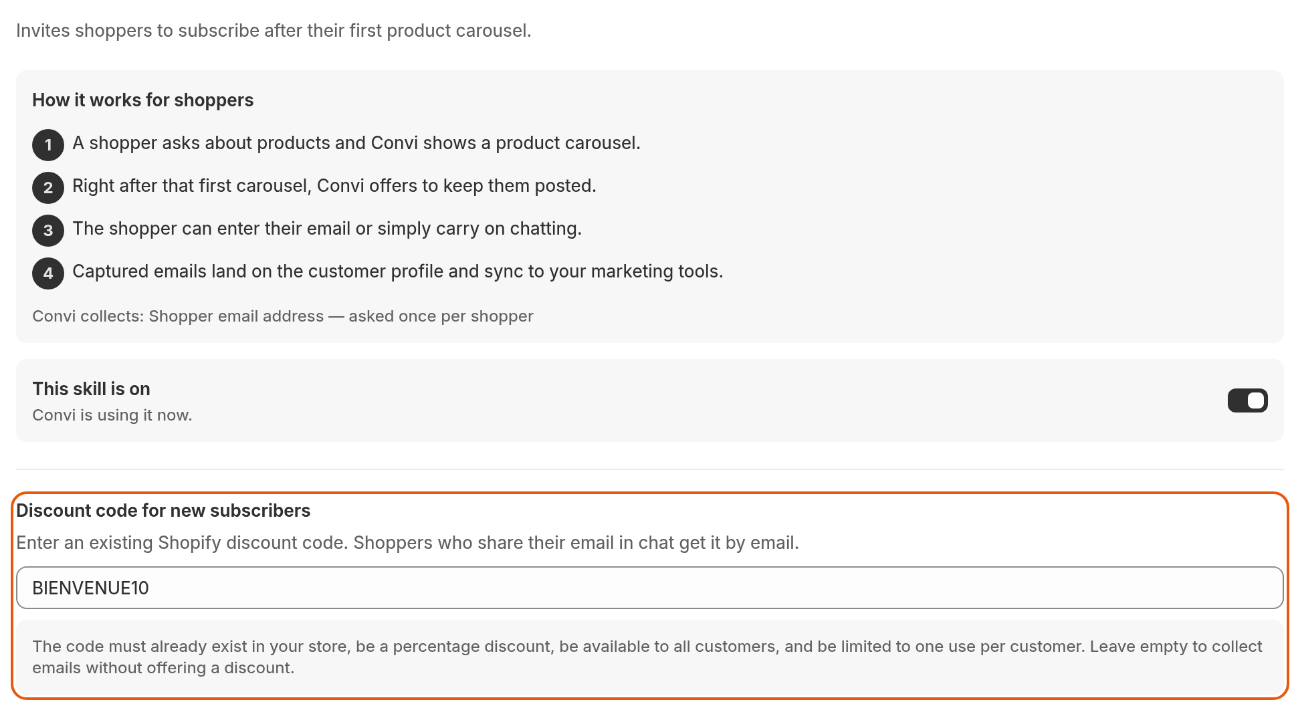
The Lead capture panel. The discount code goes under Discount code for new subscribers.
Convi emails the code only to an email address it hasn't seen in your store's chats before. The email's subject reads, for example, "Your 10% off code for Maison Lumière". The email is in English, whatever the shopper's language, and says Convi sent it on behalf of your store.
Where do the emails go?
Every email a shopper gives in the chat is kept with the conversation, and sent to the apps you've connected. The panel's "customer profile" is the shopper's details in Conversations, not a customer in Shopify. You'll find the email:
in Conversations: under the conversation's title in the list, and in its Details, under Contact;
in your email marketing app, if it's connected in Integrations: Klaviyo or Mailchimp (Starter and higher plans), or Omnisend (Pro and higher plans). Convi adds the email as a contact there;
in Shopify Flow, if it's connected in Integrations: the trigger Shopper email captured can start your own workflow, for example to tag the customer.
These places also get the emails shoppers give in other parts of a chat, for example to track an order or to reach your team.
Convi doesn't add the email to your customers in Shopify. To do that, use the Shopify Flow trigger.
Test Lead capture
The live preview in Learn never shows the Lead capture form. To see it as a shopper does:
Open your store in a private browser window.
Open the chat and ask about a product, for example "Show me your bestsellers".
After Convi shows the products, the form appears. A chat on your live store counts like any shopper's conversation.
What Lead capture doesn't do
Lead capture has these limits:
It asks each shopper once. A shopper who skipped the form isn't asked again.
It doesn't show the form in the live preview.
It doesn't confirm the email or ask for marketing consent: the form has only the email field.
Related
Choose what Convi can do with skills — every skill Convi has, and how to turn skills on.
Convi's plans and prices — the plans that include Lead capture and Klaviyo sync.
Hand over a conversation and take it back — when Convi passes a shopper to your team, with their email.