
Sometimes two sources in Convi's knowledge give different answers to the same question, so shoppers may get the wrong one. This article shows you how to find these conflicts and fix them. It is for store owners and team members who look after what Convi knows.
Plans: every plan and the free trial · Where: Convi admin › Learn › Improve › Knowledge conflicts · Who: the store owner, and team members whose role allows it · Time: about 5 minutes per conflict
What is a knowledge conflict?
A knowledge conflict is two entries in Convi's knowledge that disagree, for example a shipping policy that says "5–7 business days" and an FAQ that says "3–5 business days". Convi finds conflicts when it looks up answers, for shoppers or in your test chats. Conflicts don't change your coverage score, so check them even when the score is high.
To see your conflicts, go to Learn › Improve. Under What to fix next, select Resolve conflicts (Resolve conflict if there is only one). The Knowledge conflicts card opens, with the highest impact first.
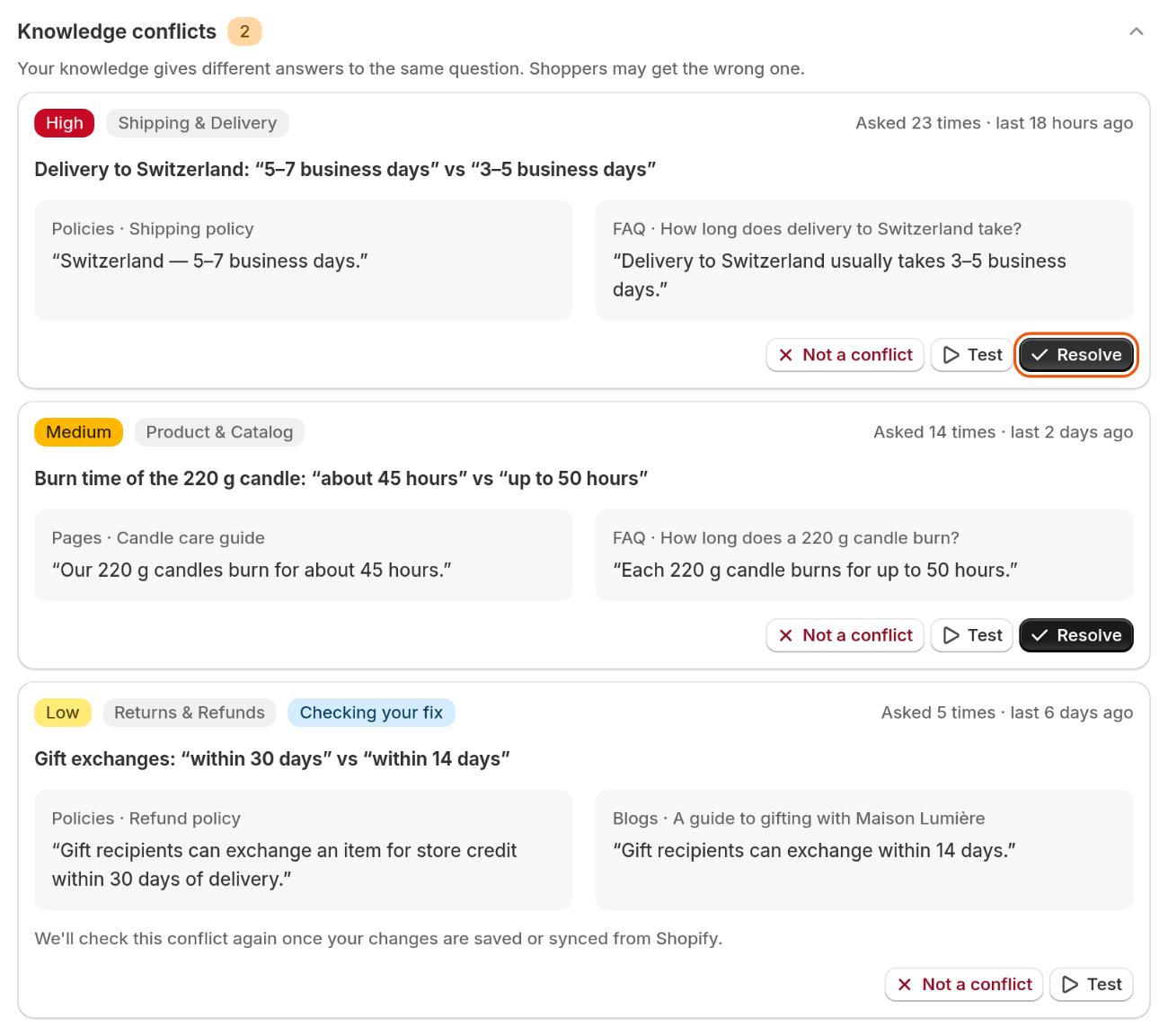
Each conflict shows both sides, and how often shoppers asked about it.
Each conflict shows its impact (High, Medium or Low), its topic, how often shoppers asked about it in the last 30 days, and what each side says.
Resolve a conflict
You resolve a conflict by saying which answer is right. Convi then drafts the fix for the other side. To resolve one:
On the conflict, select Resolve.
Under Which answer is correct?, pick one side. The first is already selected, so check your choice. If both are wrong, select Neither — I'll write the correct answer and write it under Correct answer.
Select Continue. The next step depends on where the wrong answer lives, as the two sections below explain.
Select Done. You'll see "Thanks! We'll check this conflict again."
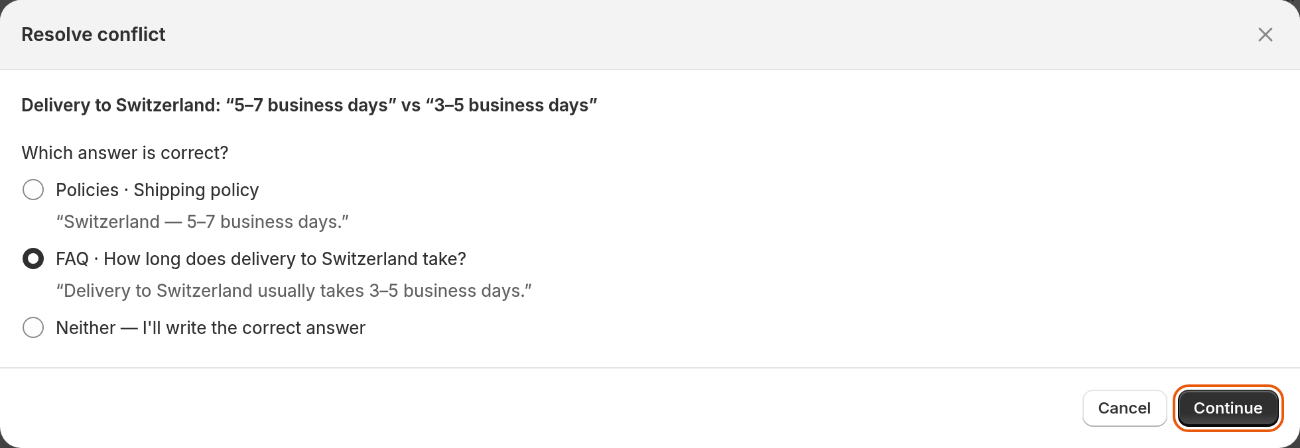
Pick the side that's right. Convi drafts the fix for the other.
The conflict stays on the list with the badge Checking your fix until Convi has checked it again. If the two sides now agree, it leaves the list. If they still disagree, it goes back to being an open conflict. If you pick Neither — I'll write the correct answer, you fix both sides in the same window.
Fix an answer that's in Convi
When the wrong answer is an entry you can edit in Convi, such as an FAQ, the window shows the whole entry under Content, with only the sentence that disagrees changed. To fix it:
Read the entry, and edit it if you need to. To remove the entry, select Delete this entry instead.
Select Done.
If you delete the entry, the conflict is resolved at once.
Fix an answer that's in Shopify
When the wrong answer comes from Shopify, such as a policy or a page, Convi can't change it for you. The window shows the text to replace under Find this text, and the new text under Replace it with. To fix it:
Select Copy corrected text.
Select Update in Shopify. The page opens in your Shopify admin, in a new tab.
Replace the text there, and save it in Shopify.
Back in Convi, select Done.
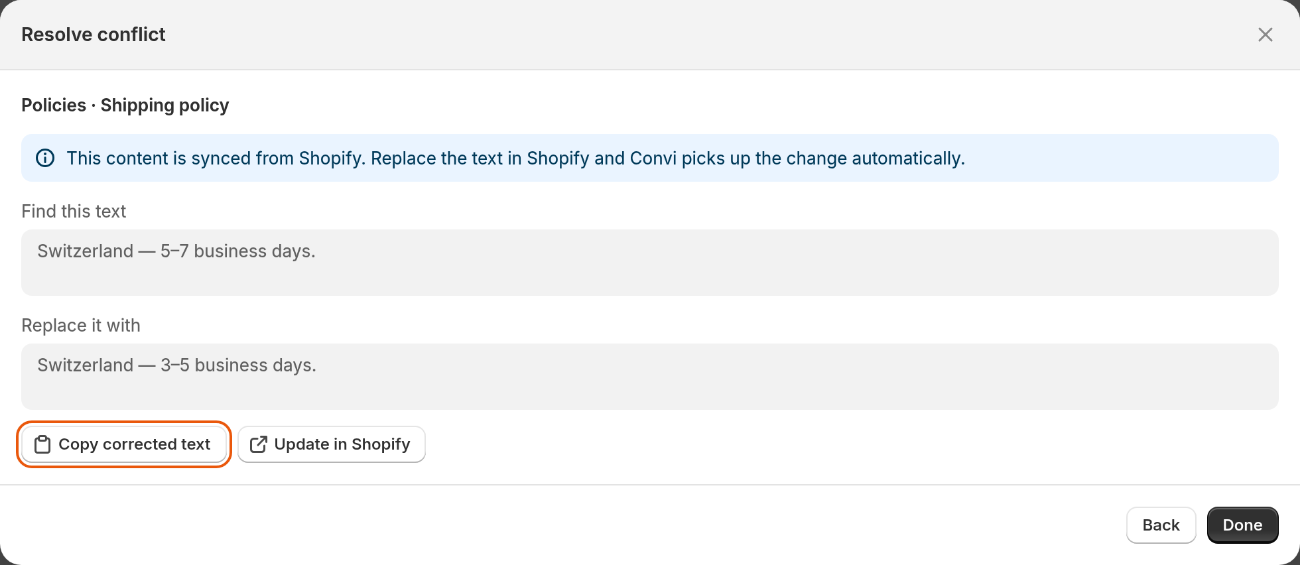
Text that comes from Shopify is changed in Shopify. Convi picks up the change by itself.
Warning: Selecting Done doesn't change anything in Shopify, so shoppers can still get the wrong answer until you change the text there. If the text in Shopify hasn't changed about 48 hours later, the conflict is open again.
Test a conflict in the live preview
You can see which answer shoppers get now, before and after your fix. To test it, select Test on the conflict: the live preview asks the question for you. Test chats don't count toward your usage.
What if it isn't really a conflict?
Sometimes two entries only look different, for example when they describe two different products. To clear one, select Not a conflict on it. You'll see "Marked as not a conflict". It stays off the list while both entries stay the same. If one of them changes and they still disagree, the conflict comes back.
What Convi doesn't do with conflicts
Convi finds conflicts and drafts the fixes, and these limits remain:
Convi never decides which answer is right: you pick, because only you know.
It finds a conflict when a lookup brings up both entries, so a conflict on a topic nobody asks about may not be listed.
It doesn't change your Shopify content.
Related
How does Convi learn about my store? — where Convi's knowledge comes from.
Why isn't Convi answering shoppers? — what to check when Convi doesn't answer.
Set your assistant's name, tone and instructions — shape how Convi answers.