
This page lists Convi's plans, what each one costs and what it includes. It is for store owners who are choosing a plan, or comparing theirs with the others.
Plans: Startup, Starter, Pro, Premium, Enterprise · Where: Convi admin › Settings › Plan & billing · Who: the store owner (team members don't see this page)
What do the plans cost?
Each plan is billed every 30 days through Shopify. It includes a number of conversations, and each conversation beyond them costs the plan's rate. The table below lists the plans as conviapp.com/pricing shows them, in US dollars.
Plan | Price every 30 days | Conversations included | Each extra conversation |
Startup | $19 | 50 | $1.00 |
Starter | $49 | 100 | $0.50 |
Pro | $149 | 500 | $0.40 |
Premium | $449 | 2,000 | $0.30 |
Enterprise | Custom | 5,000 or more | A custom rate |
The admin shows these prices per month (/mo), and the included conversations as "monthly": each billing period is 30 days.
Startup is for eligible stores only, and the Convi team approves it store by store. There is no free plan and no yearly billing. The Free plan limit badge you may see on Home means that Convi reads only about 1,000 of your products until you pick a plan. Every new store starts with a free trial of 7 days or 100 conversations: see How does the free trial work?.
Note: A conversation counts only when it ends with Convi answering the shopper, not your team. Conversations that end with your team, previews and test chats never count. See What counts as a conversation?.
What does every plan include?
Every plan, from Startup up, includes these features:
the eight widgets on the Widgets page: Bubble widget chatbot, Inline chat, AI FAQ Widget, Ask AI Button, AI Search Bar, Find similars, AI Review Summary and WhatsApp Widget;
product search, comparisons, quick view and adding to the cart from the chat;
order tracking, and handover to your team;
your store's knowledge, your own FAQs, instructions and rules;
web search, answers in every language, and setting Convi up by chatting with Convi Coach;
revenue analytics.
What does each plan add?
Each plan keeps everything in the plan below it and adds more. The table below lists what each plan adds to the one before it.
Plan | What it adds |
Starter | AI support by email; order cancellations and address changes; back-in-stock alerts (Notify Me!) and subscription management (Subi); lead capture with discount codes, and Klaviyo sync; removing the Convi branding |
Pro | AI support on WhatsApp, Instagram and Messenger; live voice conversations and photo questions; email from your own domain |
Premium | Team members with roles; the public API |
Enterprise | 5,000 or more conversations at a custom rate; custom features built for your store; a dedicated success manager; hands-on onboarding; priority support with an agreed SLA |
The full comparison is under Compare plans in Settings › Plan & billing, and on conviapp.com/pricing.
Which plan should I choose?
Choose the plan whose included conversations cover a usual month for your store. To see how many conversations your store uses:
Go to Settings › Plan & billing, or to Home.
At the top of the Your plan card, read the conversations used out of those included, for example "312 / 500 included". During the free trial, read the conversations used in the Free trial card.
Bigger plans charge less for each extra conversation. If you often pay for extra conversations, a bigger plan may work out cheaper.
Choose a plan
You choose a plan in the Convi admin and approve it in Shopify. To choose a plan:
Go to Settings › Plan & billing.
Under Subscription plans, find the plan you want and select its button, for example Choose Pro.
Shopify opens. Approve the plan, and the spending limit for extra conversations.
Back in Convi, the plan shows Current plan. For Enterprise, select Talk to us about Enterprise; for Startup, Talk to us about Startup, on its own row below the plan cards. Both open a message to the Convi team, already written: send it, and the team replies there. If no message opens, email [email protected].
The Startup row in the admin says "Everything in Starter": the plan lists above are the ones that apply.
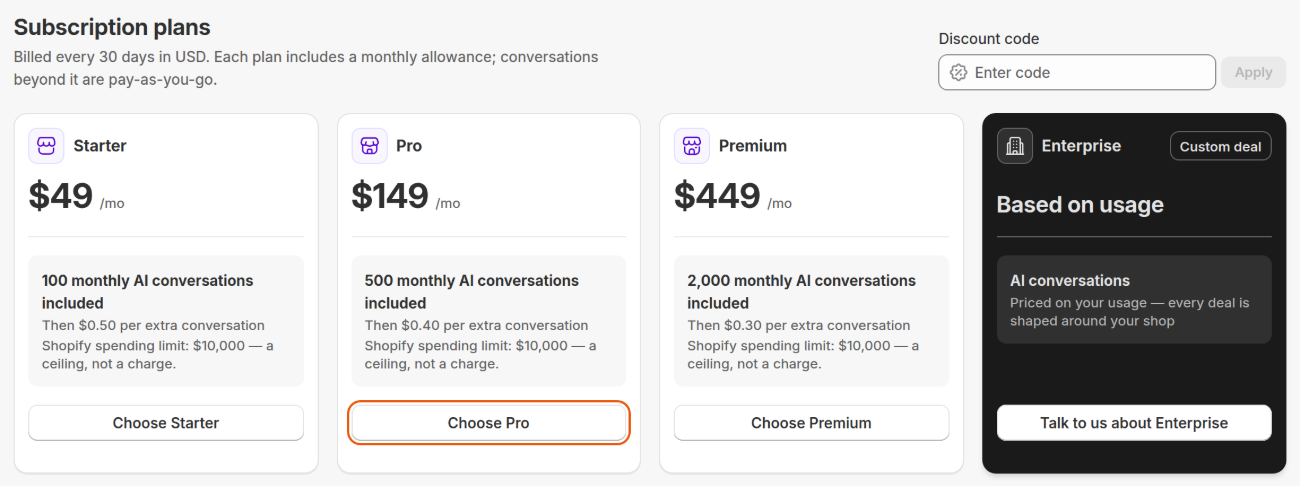
The Starter, Pro and Premium cards show the price, the conversations included and the rate for extra ones. Enterprise is priced with you.
Related
How billing works: included and extra conversations — your charges, extra conversations and the spending limit.
Change or cancel your plan — upgrade, move to a smaller plan, or cancel.
How does the free trial work? — what the trial includes and when it ends.