
You can change your Convi plan or cancel it at any time, in the Convi admin. This article is for store owners who want to upgrade, move to a smaller plan, cancel, or use a discount code.
Plans: Starter, Pro, Premium; Startup and Enterprise through the Convi team · Where: Convi admin › Settings › Plan & billing · Who: the store owner (team members don't see this page) · Time: about 2 minutes
Every new plan you choose is approved in Shopify, which bills you for Convi. You cancel, or keep a plan you cancelled, in Convi itself. There is no yearly billing to switch to: every plan is billed every 30 days.
Upgrade to a bigger plan
A bigger plan starts as soon as you approve it, with a full new allowance of conversations. To upgrade:
In the Convi admin, go to Settings › Plan & billing.
Under Subscription plans, find the plan you want and select its button, for example Choose Premium.
Shopify opens. Approve the plan.
Back in Convi, the new plan shows Current plan.
Move to a smaller plan
A smaller plan also starts at once, with its allowance. To move to a smaller plan:
In Learn › Skills, turn off any skill the smaller plan doesn't include, for example Suggest bundles below Premium. After the move, you can't change it there.
Go to Settings › Plan & billing.
On the smaller plan, select its button, for example Choose Starter. A window opens, for example Downgrade to Starter.
Read what changes, for example "Your resolution limit will decrease to 100 per month": that is the new plan's included conversations.
Select Confirm downgrade.
Shopify opens. Approve the plan.
Warning: A move to a smaller plan doesn't wait for the end of your cycle. As soon as you approve it, Convi uses the smaller plan's allowance. A skill that is on stays on, even if the smaller plan doesn't include it, and you can't switch it off after the move: turn it off first (step 1). Your conversation history is kept.
If a charge after a plan change looks wrong, email [email protected] with your store's address and the date of the charge.
Cancel your plan
When you cancel, your plan keeps working until the end of the period you've paid for. To cancel:
Go to Settings › Plan & billing.
Select Cancel plan. A window asks "Cancel your Pro plan?", with your plan's name.
Read the dates: when the plan stops, and when extra conversations already used are billed.
Select Cancel plan.
Your plan shows Cancellation scheduled. After the end date, Convi stops answering shoppers and your widgets are hidden. Your training, widgets and conversation history stay saved, and you can pick a plan again at any time to be live straight away.
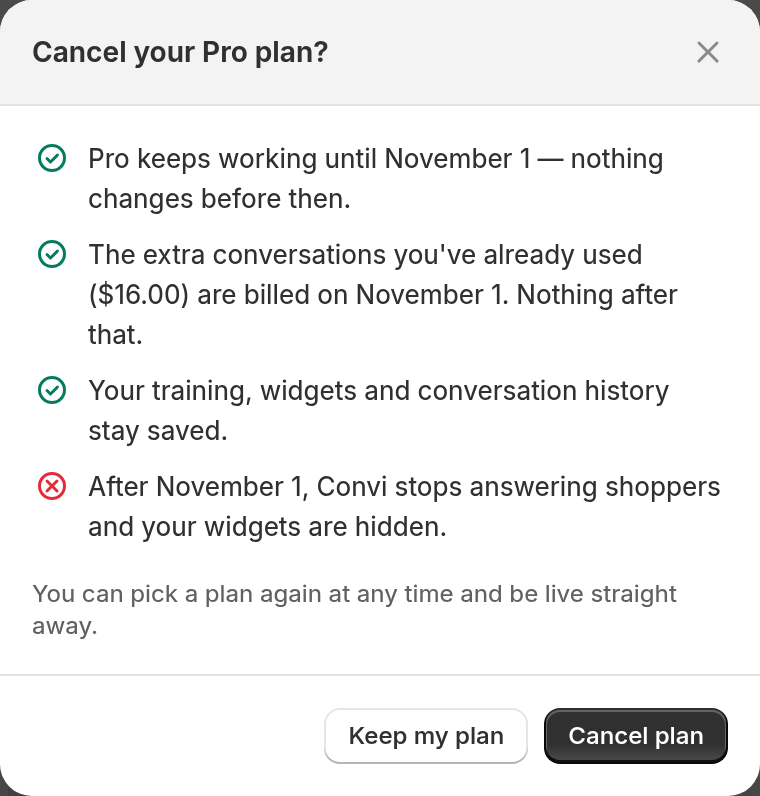
Before you confirm, the window shows when your plan stops and what is billed.
Note: Uninstalling Convi from Shopify isn't the same as cancelling: it ends your plan at once, and a reinstall doesn't start a new trial. To keep the time you've paid for, cancel here instead.
Keep a plan you cancelled
Until the end date, you can undo a cancellation. To keep your plan:
Go to Settings › Plan & billing.
In the Cancellation scheduled banner, select Keep my plan.
Your plan carries on as before.
Use a discount code
A discount code from the Convi team applies to the next plan you choose. To use a code on the plan you already have, email [email protected]. To use one on a new plan:
Go to Settings › Plan & billing.
In Discount code, enter the code.
Select Apply. The field is replaced by Discount: and your code, with Remove.
Under Subscription plans, select the plan's button, for example Choose Pro. For a smaller plan, confirm the downgrade in the window that opens.
Shopify opens. Approve the plan.
Back in Convi, the new plan shows Current plan.
If the code doesn't work, after Apply you'll see "That code isn't valid. Check it and try again."
Move to Startup or Enterprise
The Convi team sets up the Startup and Enterprise plans with you. To ask for one:
Go to Settings › Plan & billing.
Select Talk to us about Startup or Talk to us about Enterprise.
Send the message that opens. The team replies there. If no message opens, email [email protected].
Startup is for eligible stores only, and the team approves it store by store.
Related
Convi's plans and prices — what each plan costs and includes.
How billing works: included and extra conversations — how changes and cancellations are billed.
How does the free trial work? — choosing a plan when your trial ends.