
Convi bills you through Shopify every 30 days: your plan's price, plus any extra conversations. This article is for store owners who pay for Convi and want to understand their charges.
Plans: Startup, Starter, Pro and Premium; Enterprise has its own terms · Where: Convi admin › Settings › Plan & billing · Who: the store owner (team members don't see the billing pages)
How does Convi bill me?
Convi uses Shopify's own billing, so its charges appear on your Shopify invoice. You never enter a card in Convi. Billing works in four steps:
You choose a plan and approve it in Shopify.
Your plan includes a number of conversations every 30 days.
Each conversation beyond them is billed at your plan's rate.
The extra conversations are added to your next Shopify charge, at the end of the cycle.
The prices and rates of each plan are in Convi's plans and prices.
What does Convi count?
Convi counts a conversation when it ends with Convi answering the shopper, not your team. Several messages in one conversation count once. Conversations that end with your team, previews and test chats never count. See What counts as a conversation?.
What happens when I use more than my plan includes?
When you use all your included conversations, Convi normally keeps answering, and each extra conversation is billed at your plan's rate. You pay only for the extra conversations you use. If your plan card shows no rate for extra conversations, your plan has none: Convi pauses when the included ones are used up, until the next cycle.
If your plan card shows a rate for extra conversations and Convi emailed you that it will pause, or has paused, when you used your included conversations, the email is most likely wrong: in most cases, Convi keeps answering and bills each extra conversation. To be sure, see "How do I know Convi has paused?" below. Your usage is in Settings › Plan & billing and on Home.
When you choose a plan, Shopify asks you to approve a spending limit for extra conversations. On Startup, Starter, Pro and Premium it is $10,000 for each 30-day billing period, as the plan cards show. It is the most Convi can bill you for extra conversations in one period, not an amount you'll be charged.
Warning: If your extra conversations use up the whole spending limit, Convi pauses until the next cycle or a new plan, and your widgets are hidden. Your plan card and Widgets don't show this pause yet.
How do I know Convi has paused?
On a paid plan with a rate for extra conversations, Convi pauses when your extra conversations use up the spending limit. While it is paused, each new message in an open conversation goes to your team under Needs help in Conversations, marked Reply limit reached. Your team is told as set in Where handoffs go: with Send to your helpdesks and the shopper's email, a ticket is created in each helpdesk you picked; otherwise, your team gets an email alert.
If you see Reply limit reached on a paid plan, or shoppers say Convi isn't answering, email [email protected] with your store's address (your-store.myshopify.com).
Where do I see my usage and charges?
Settings › Plan & billing shows your plan, your usage and your next charge, and Home shows the same plan card. To check them:
Go to Settings › Plan & billing, or to Home.
At the top of the Your plan card, read the conversations used out of those included, for example "312 / 500 included", and any extra so far. The date under AI conversations this cycle is when the count resets.
Read Next charge and Extra conversations, the rate you pay for each extra one.
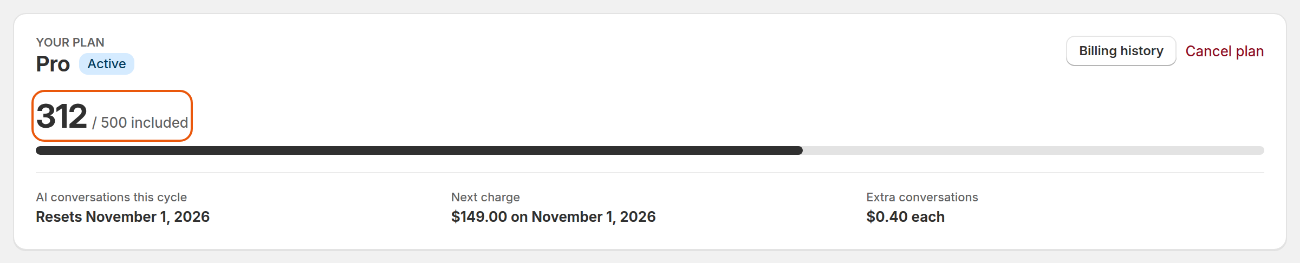
The usage panel shows the conversations used this cycle, your next charge and your rate for extra conversations.
To see past charges, select Billing history. It shows your Next charge, marked Estimated while usage is still being counted, and your Payment history. Billing history calls extra conversations "resolutions". To download a payment's statement, select the download icon in its Statement column.
What happens when I change my plan?
A new plan starts when you approve it in Shopify:
A bigger plan starts at once, with a full new allowance of conversations.
A smaller plan also starts at once, with its allowance. A skill that is already on stays on, even if the smaller plan doesn't include it.
Cancelling happens in Convi, not in Shopify. It keeps your plan until the end of the period you've paid for. Extra conversations already used are billed then, and nothing after that.
See Change or cancel your plan for the steps.
If a charge looks wrong, email [email protected] with your store's address (your-store.myshopify.com) and the date of the charge.
What isn't billed?
Some things never cost you anything:
the free trial, which is never charged;
conversations that end with your team;
test chats in the live preview, in Learn;
previews of your widgets.
Related
Convi's plans and prices — each plan's price, included conversations and rate.
What counts as a conversation? — exactly what Convi counts toward your plan.
Change or cancel your plan — upgrade, move to a smaller plan, or cancel.