
Learn › Persona is where you decide how Convi talks to your shoppers: its name, its tone, how long its answers are, and what it should know about your store. This article is for store owners who want Convi to sound like their brand.
Plans: every plan and the free trial · Where: Convi admin › Learn › Persona · Who: the store owner, and team members whose role allows it · Time: about 10 minutes
What's on the Persona page?
Learn › Persona has three cards, and the live preview on the right:
Identity: the assistant's name.
Voice: its tone and the length of its answers.
Advanced instructions: what Convi should know about your store and how to answer.
When you change anything, a bar appears with Save and Discard. Nothing changes for shoppers until you save.
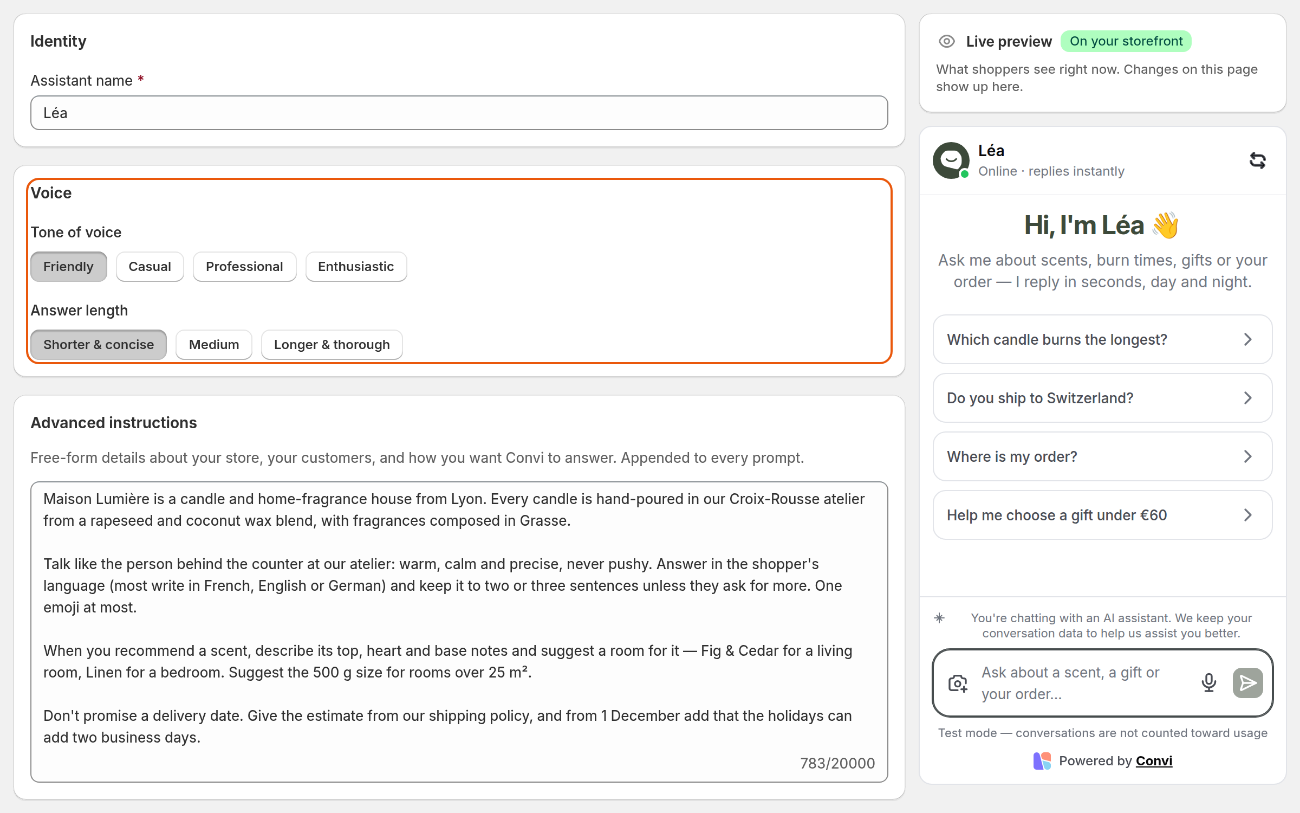
The Persona page. The live preview on the right shows the chat as shoppers see it.
Name your assistant
The assistant's name shows at the top of the chat. To change it:
Go to Learn › Persona.
In Identity, type the name in Assistant name, up to 40 characters. A name is required.
Select Save. The bar closes, and new chats show the new name.
The chat's welcome message has its own words, for example "Hi, I'm Léa 👋". If it names your assistant, change it too: in Widgets, on the Bubble widget chatbot card, select Manage, then Content, edit Chat welcome, and select Save in the Bubble widget window. If your store has other languages, change Chat welcome under Translations too.
Choose the tone and the answer length
The Voice card sets how Convi sounds. To change it:
Go to Learn › Persona.
In Voice, under Tone of voice, choose Friendly, Casual, Professional or Enthusiastic.
Under Answer length, choose Shorter & concise, Medium or Longer & thorough.
Select Save. The bar closes, and Convi's next answers use the new tone and length.
A new store starts with Friendly and Medium, unless you chose another tone during setup.
Write advanced instructions
Advanced instructions is free text that Convi reads before every answer. Use it to tell Convi what it can't learn from your store's pages. To write it:
Go to Learn › Persona.
In Advanced instructions, write about your store, your customers and how you want Convi to answer, up to 20,000 characters. The counter below the box shows how many you've used.
Select Save. The bar closes, and Convi follows the instructions from its next answer.
For example: "We sell handmade candles for people who love cozy, natural scents. Our customers are mostly women aged 25–45. We ship in 2–3 days, accept returns within 14 days, and respond via email and Instagram."
These tips help Convi follow your instructions:
Write facts and how to talk, in short sentences: what you sell, who buys it, what Convi should never promise.
For "when a shopper asks X, do Y", add a rule in Learn › Rules instead. You can turn each rule on or off on its own.
For answers to specific questions, such as your return window, add an FAQ in Learn › Knowledge. See How does Convi learn about my store?.
Check how Convi sounds
The live preview on the right of every Learn tab is the chat as shoppers see it on your store, with your saved settings. Test chats there don't count toward your usage. To check your changes:
Select Save.
In the live preview, select the reset icon at the top right (Reset conversation) to start a new chat.
Ask what a shopper would ask, for example "Which candle burns the longest?".
Convi answers with the new name, tone and instructions. Ask the same question before and after a change to compare.
You can also ask Convi Coach, at the bottom right of every page, to change these settings for you.
What Persona doesn't change
Some settings that shape the chat are elsewhere:
The chat's colors, logos, avatar and texts are in Widgets. See Customize how the Bubble widget chatbot looks.
What Convi can do, such as tracking orders, is set by its skills. See Choose what Convi can do with skills.
Related
Customize how the Bubble widget chatbot looks — the chat's look and texts.
How does Convi learn about my store? — the pages, policies and FAQs Convi answers from.
Choose what Convi can do with skills — the tasks Convi can do for shoppers.